
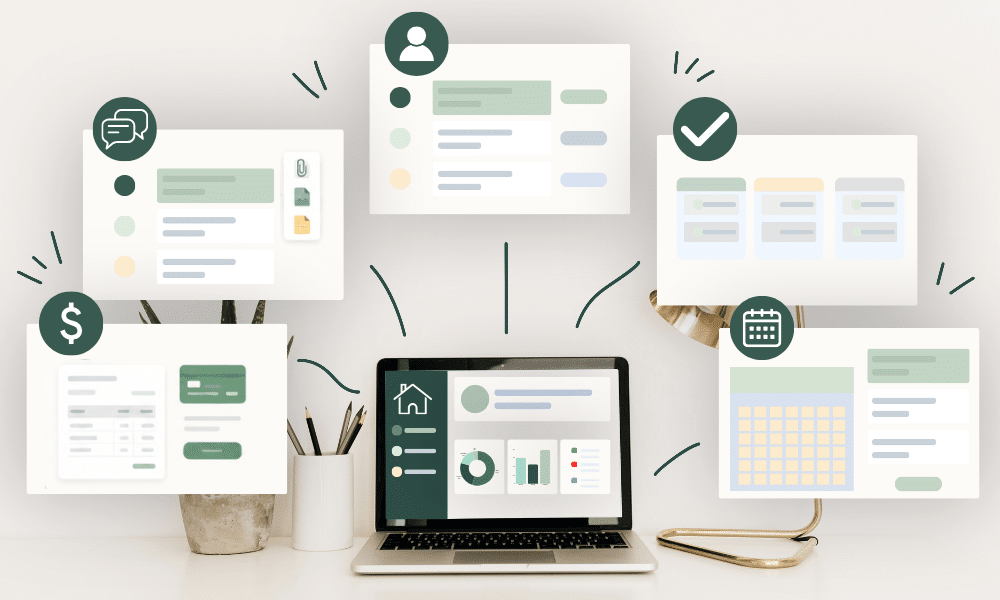
If I were setting up the operations of a new service business with one to five people, I would not begin by buying a complete software stack. I would make sure five essential jobs were covered first:
- communication and files
- client tracking
- project and task management
- invoicing and payment tracking
- scheduling and intake
The specific software matters less than making sure each job has one clear home. You can start several of these with tools you already use and upgrade only when the limitations begin to cost you time, clarity, or money.
1. A dependable workspace for email, files, and calendar
This is the least glamorous item on the list and probably the most important. Your business needs a reliable place for email, client documents, internal documents, shared files, calendars, basic spreadsheets, and forms.
Google Workspace is an obvious example because it combines Gmail, Drive, Calendar, Docs, Sheets, Forms, Meet, and other tools under one business account. Google Workspace for small businesses Microsoft 365 fills a similar role for businesses that already prefer that ecosystem.
The real decision is not Google versus Microsoft. It is whether your team knows where business information belongs and whether everyone can reliably access the current version.
A proposal should not live as FINAL_v4_reallyfinal.docx on one person’s desktop, and a client file should not disappear when someone leaves the business. A shared foundation makes every other system easier to manage.
Keep the setup simple at first. Create sensible shared folders, use a business-domain email, agree on basic naming conventions, and set permissions deliberately. Those habits solve more operational problems than buying a fashionable app and hoping everyone adopts it.
2. A client and lead tracker
You need one place to see new enquiries, qualified leads, proposals sent, booked clients, follow-up dates, and next actions. At first, that place can absolutely be a spreadsheet.
That is not a compromise. A simple tracker is often the right tool while you are still learning how people move through your sales process, because you can change fields and stages quickly without rebuilding a larger system.
Move to a CRM when several people need the same client history, follow-ups become unreliable, or maintaining the tracker itself starts taking too much time. The important thing is to avoid keeping client status only in email, because your inbox is a communication tool, not a pipeline.
3. A project-management system
Project management can also start smaller than most software companies would have you believe. A solo provider with only a handful of active projects may need nothing more than a reliable task list.
As the team or workload grows, the project system should make tasks, owners, due dates, status, blockers, and client approvals visible in one place. Project-tracking tools are designed to centralise those moving parts so people can see what is happening without relying on repeated status questions. Asana describes effective project tracking around visibility into tasks, responsibilities, progress, and deadlines. Asana on project tracking
Whether you choose Asana, monday.com, ClickUp, Trello, or something else, resist the urge to recreate every feature the software offers. Start with the smallest workflow your team will actually maintain, such as:
To Do → In Progress → Waiting → Done
Add complexity only after you have evidence that you need it. A simple system people use consistently is better than an elaborate one everyone quietly ignores.
4. Invoicing and payment tracking
Your business needs a reliable way to turn agreed work into money received. At minimum, you should be able to see the invoice amount, issue date, due date, paid amount, payment date, and remaining balance.
Use proper accounting or invoicing software when your legal, tax, or record-keeping requirements call for it. From an operational standpoint, however, the essential point is visibility.
Nobody should discover an unpaid invoice two months later because they happened to search their sent mail. If you use deposits or milestone payments, define when each payment is due and what happens if it does not arrive on time.
The process matters as much as the software because a good tool cannot compensate for unclear payment rules.
5. Scheduling and intake
I combine scheduling and intake because both reduce the same kind of friction: repetitive coordination before the work begins.
If clients regularly book calls, consultations, appointments, or sessions, a scheduling tool can remove long email threads about availability. If your work rarely requires clients to book time directly, you may not need a paid scheduler at all.
The same principle applies to intake forms. If you ask every client the same questions, collect those answers in a structured form rather than scattering them across several emails.
Start with the basic form tool you already have and upgrade only when you genuinely need features such as conditional questions, advanced branding, payments, file uploads, automated routing, or integrations. Do not add software because one feature sounds clever; add it because the current process is creating avoidable work.
What I would delay
Several categories are worth postponing until the business gives you a real reason to add them.
I would not start with a sophisticated CRM unless you already need automation, shared interaction history, or a larger pipeline. I would also delay a large automation platform until the underlying workflow has stabilised, because automating a process that changes every two weeks creates maintenance rather than efficiency.
A tiny business rarely needs a full knowledge-management system on day one either. If you have three useful SOPs, store them clearly in Docs instead of constructing the Alexandria Library of Operations before anyone has written the procedures.
The same restraint applies to communication tools and specialist software. Email plus one internal communication channel is usually enough for a tiny team, and every additional place where someone can send an important request creates another place the team has to monitor.
Most importantly, do not buy software for hypothetical future problems. A three-person business does not need infrastructure designed for fifty employees simply because growth is part of the plan.
Let the client workflow shape the stack
If you are unsure what you need, map the client journey first:
Inquiry → Qualification → Proposal → Booking → Onboarding → Active Work → Completion → Offboarding → Feedback
Then ask what tool supports each stage. That is much easier than shopping from a giant list of SaaS categories and trying to invent a use for whatever looks impressive.
You can see the full process in The Simplest Client Workflow for a Tiny Service Business. For the wider framework, The Small Business Tech Stack: What a Tiny Service Business Actually Needs explains how the pieces fit together.
The five-tool rule is not literal
One product may cover several jobs. Google Workspace, for example, can handle email, documents, spreadsheets, forms, meetings, and calendar, while another business may prefer separate specialist tools for each function.
You may not need scheduling software at all, and you may need specialist industry software that does not appear on this list. The point is not to own exactly five subscriptions.
The point is to cover the five operational needs without accidentally creating five different sources of truth.
A good stack should feel boring
That is a compliment.
A good business system does not require constant tinkering. People know where to look, information stays current, handoffs remain visible, clients receive what they need, and money gets tracked properly.
Eventually, you stop thinking about the software because the work moves through it naturally. That is the standard I would use when deciding whether a tool belongs in a tiny team: not whether it has impressive features, but whether it quietly makes the business easier to run.